樹莓派介紹
-
樹莓派(RaspberryPI)是由英國營利組織的樹莓派基金會(Raspberry Pi Foundation)所開發的一片信用卡般大的電路板,搭載處理器(ARM CPU)和Linux系統,以 SD 卡為硬碟,目的是以低價硬體及自由軟體刺激學校的電腦科學教育。樹莓派有開放許多的GPIO(General Purpose Input Output)腳位可以連接許多週邊硬體電子零件。
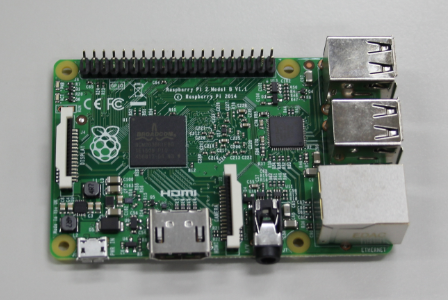

- 本單元影片由財團法人善科教育基金會贊助,由南港高中第一屆數位科學實驗班侯諧言同學製作。
-
Synchronizing Time on Raspberry Pi
Using
timedatectlCheck Current Time Settings
Open the terminal and run:timedatectlThis command shows the current time settings and whether NTP (Network Time Protocol) is enabled.
Enable NTP Synchronization
To enable automatic time synchronization, use:sudo timedatectl set-ntp trueVerify NTP Status
After enabling, check the status again with:timedatectlEnsure that "NTP service" is active.
Configuring NTP Servers
If you want to change the NTP server:
1.Edit the configuration file:
sudo nano /etc/systemd/timesyncd.conf2.Modify the
FallbackNTPline to your preferred server, for example:FallbackNTP=time.nist.gov3.Restart the NTP service:
sudo systemctl restart systemd-timesyncdConclusion
By following these steps, you can ensure that your Raspberry Pi maintains accurate time through network synchronization. This is essential for various applications, especially those requiring precise timestamps.
-