認識電腦視覺
-
目前電腦視覺領域正處於從「感知」轉向「理解」的轉型期,在物件偵測 (Object Detection) 部份的技術已極為成熟,主流的 YOLO ( You Only Look Once ) 系列已進步到在可以在邊緣運算設備( 例如:Ameba ) 上展現極致的即時推論反應。
-
什麼是「物件偵測」?
物件偵測就是在照片或影片等圖像內容中,用框 (anchor) 標出物件的範圍,並且分類為何種物件及附帶模型對此物件的信心程度。
目前最熱門最有名的物件偵測模型就是 YOLO
全名:You Only Look OnceYOLO 系列模型採用深度卷積神經網路(CNN),以端到端的方式進行物件偵測。它是目前最常見且應用很廣的物件偵測方法,例如:人流偵測、車牌辨識等。
優勢 : 速度快(適合即時)、易於訓練和部署、無遮擋or偵測大型物件的精確率高
劣勢 : 小物件偵測較差、複雜情況下精確率低
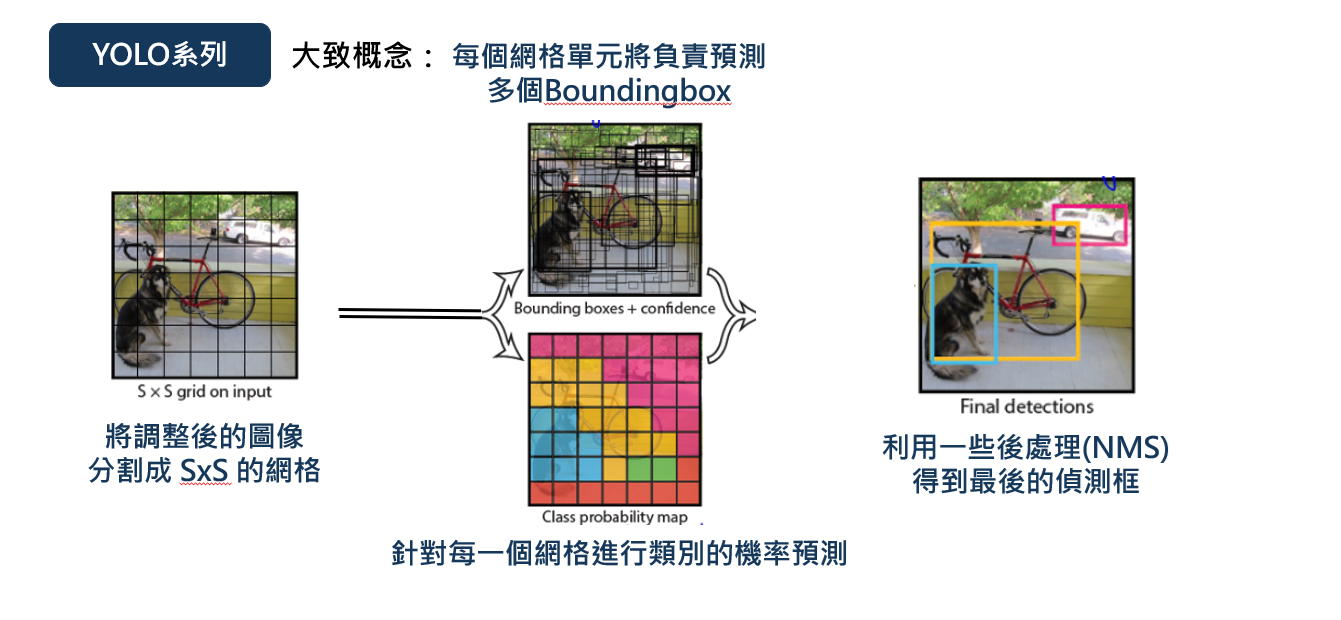
圖片來源:NTNU AIOTLab 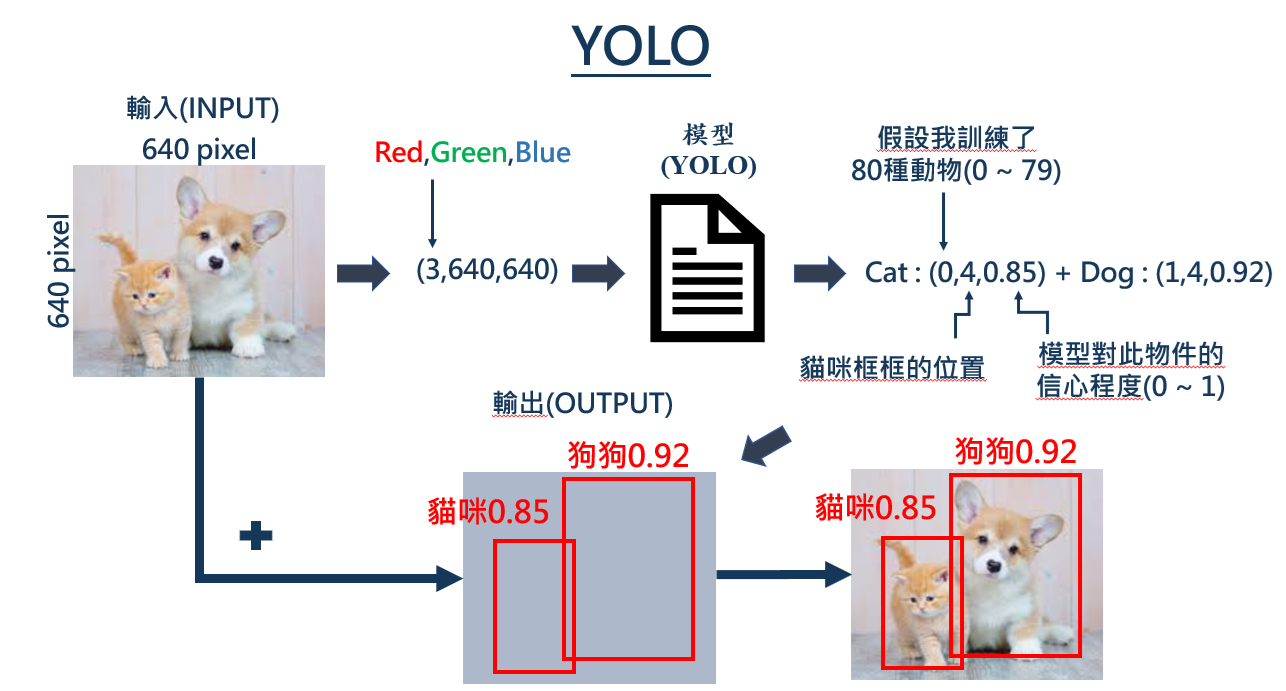
圖片來源:NTNU AIOTLab -
使用 Ameba 實作「物件偵測」
透過連接在 Ameba 開發板上的鏡頭,我們可以即時將拍到的畫面進行「物件偵測」辨識,因為 Ameba 本身自己就有 Wifi 天線,所以在「程式碼」中,需指定與想觀看鏡頭串流的電腦 VLC 應用程式的無線網路是使用同一個 AP 。
在Arduino IDE中,尋找以下路徑:

【程式碼】
/*
 Example guide:
 https://ameba-doc-arduino-sdk.readthedocs-hosted.com/en/latest/ameba_pro2/amb82-mini/Example_Guides/Neural%20Network/Object%20Detection.html

 NN Model Selection
 Select Neural Network(NN) task and models using modelSelect(nntask, objdetmodel, facedetmodel, facerecogmodel).
 Replace with NA_MODEL if they are not necessary for your selected NN Task.

 NN task
 =======
 OBJECT_DETECTION/ FACE_DETECTION/ FACE_RECOGNITION

 Models
 =======
 YOLOv3 model         DEFAULT_YOLOV3TINY   / CUSTOMIZED_YOLOV3TINY
 YOLOv4 model         DEFAULT_YOLOV4TINY   / CUSTOMIZED_YOLOV4TINY
 YOLOv7 model         DEFAULT_YOLOV7TINY   / CUSTOMIZED_YOLOV7TINY
 SCRFD model          DEFAULT_SCRFD        / CUSTOMIZED_SCRFD
 MobileFaceNet model  DEFAULT_MOBILEFACENET/ CUSTOMIZED_MOBILEFACENET
 No model             NA_MODEL
 */

#include "WiFi.h"
#include "StreamIO.h"
#include "VideoStream.h"
#include "RTSP.h"
#include "NNObjectDetection.h"
#include "VideoStreamOverlay.h"
#include "ObjectClassList.h"

#define CHANNEL   0
#define CHANNELNN 3

// Lower resolution for NN processing
#define NNWIDTH  576
#define NNHEIGHT 320

VideoSetting config(VIDEO_FHD, 30, VIDEO_H264, 0);
VideoSetting configNN(NNWIDTH, NNHEIGHT, 10, VIDEO_RGB, 0);
NNObjectDetection ObjDet;
RTSP rtsp;
StreamIO videoStreamer(1, 1);
StreamIO videoStreamerNN(1, 1);

char ssid[] = "Network_SSID";    // your network SSID (name)
char pass[] = "Password";        // your network password
int status = WL_IDLE_STATUS;

IPAddress ip;
int rtsp_portnum;

void setup()
{
    Serial.begin(115200);

    // attempt to connect to Wifi network:
    while (status != WL_CONNECTED) {
        Serial.print("Attempting to connect to WPA SSID: ");
        Serial.println(ssid);
        status = WiFi.begin(ssid, pass);

        // wait 2 seconds for connection:
        delay(2000);
    }
    ip = WiFi.localIP();

    // Configure camera video channels with video format information
    // Adjust the bitrate based on your WiFi network quality
    config.setBitrate(2 * 1024 * 1024);    // Recommend to use 2Mbps for RTSP streaming to prevent network congestion
    Camera.configVideoChannel(CHANNEL, config);
    Camera.configVideoChannel(CHANNELNN, configNN);
    Camera.videoInit();

    // Configure RTSP with corresponding video format information
    rtsp.configVideo(config);
    rtsp.begin();
    rtsp_portnum = rtsp.getPort();

    // Configure object detection with corresponding video format information
    // Select Neural Network(NN) task and models
    ObjDet.configVideo(configNN);
    ObjDet.modelSelect(OBJECT_DETECTION, DEFAULT_YOLOV4TINY, NA_MODEL, NA_MODEL);
    ObjDet.begin();

    // Configure StreamIO object to stream data from video channel to RTSP
    videoStreamer.registerInput(Camera.getStream(CHANNEL));
    videoStreamer.registerOutput(rtsp);
    if (videoStreamer.begin() != 0) {
        Serial.println("StreamIO link start failed");
    }

    // Start data stream from video channel
    Camera.channelBegin(CHANNEL);

    // Configure StreamIO object to stream data from RGB video channel to object detection
    videoStreamerNN.registerInput(Camera.getStream(CHANNELNN));
    videoStreamerNN.setStackSize();
    videoStreamerNN.setTaskPriority();
    videoStreamerNN.registerOutput(ObjDet);
    if (videoStreamerNN.begin() != 0) {
        Serial.println("StreamIO link start failed");
    }

    // Start video channel for NN
    Camera.channelBegin(CHANNELNN);

    // Start OSD drawing on RTSP video channel
    OSD.configVideo(CHANNEL, config);
    OSD.begin();
}

void loop()
{
    std::vector<ObjectDetectionResult> results = ObjDet.getResult();

    uint16_t im_h = config.height();
    uint16_t im_w = config.width();

    Serial.print("Network URL for RTSP Streaming: ");
    Serial.print("rtsp://");
    Serial.print(ip);
    Serial.print(":");
    Serial.println(rtsp_portnum);
    Serial.println(" ");

    printf("Total number of objects detected = %d\r\n", ObjDet.getResultCount());
    OSD.createBitmap(CHANNEL);

    if (ObjDet.getResultCount() > 0) {
        for (int i = 0; i < ObjDet.getResultCount(); i++) {
            int obj_type = results[i].type();
            if (itemList[obj_type].filter) {    // check if item should be ignored

                ObjectDetectionResult item = results[i];
                // Result coordinates are floats ranging from 0.00 to 1.00
                // Multiply with RTSP resolution to get coordinates in pixels
                int xmin = (int)(item.xMin() * im_w);
                int xmax = (int)(item.xMax() * im_w);
                int ymin = (int)(item.yMin() * im_h);
                int ymax = (int)(item.yMax() * im_h);

                // Draw boundary box
                printf("Item %d %s:\t%d %d %d %d\n\r", i, itemList[obj_type].objectName, xmin, xmax, ymin, ymax);
                OSD.drawRect(CHANNEL, xmin, ymin, xmax, ymax, 3, OSD_COLOR_WHITE);

                // Print identification text
                char text_str[20];
                snprintf(text_str, sizeof(text_str), "%s %d", itemList[obj_type].objectName, item.score());
                OSD.drawText(CHANNEL, xmin, ymin - OSD.getTextHeight(CHANNEL), text_str, OSD_COLOR_CYAN);
            }
        }
    }
    OSD.update(CHANNEL);

    // delay to wait for new results
    delay(100);
}
將以下兩行改成你的無線網路環境。
char ssid[] = "Network_SSID";    // your network SSID (name)
char pass[] = "Password";        // your network password
燒錄程式後,點選右上角的放大鏡圖示,打開 Serial Monitor ,找到 Ameba 的 IP address 。

圖片來源:NTNU AIOTLab 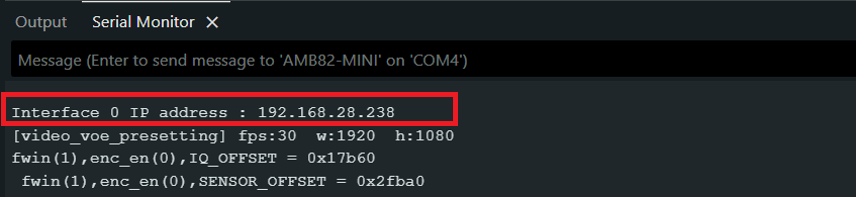
圖片來源:NTNU AIOTLab 打開 VLC Media Player 的 媒體/開啟網路串流,輸入rtsp://你的IP Address:554
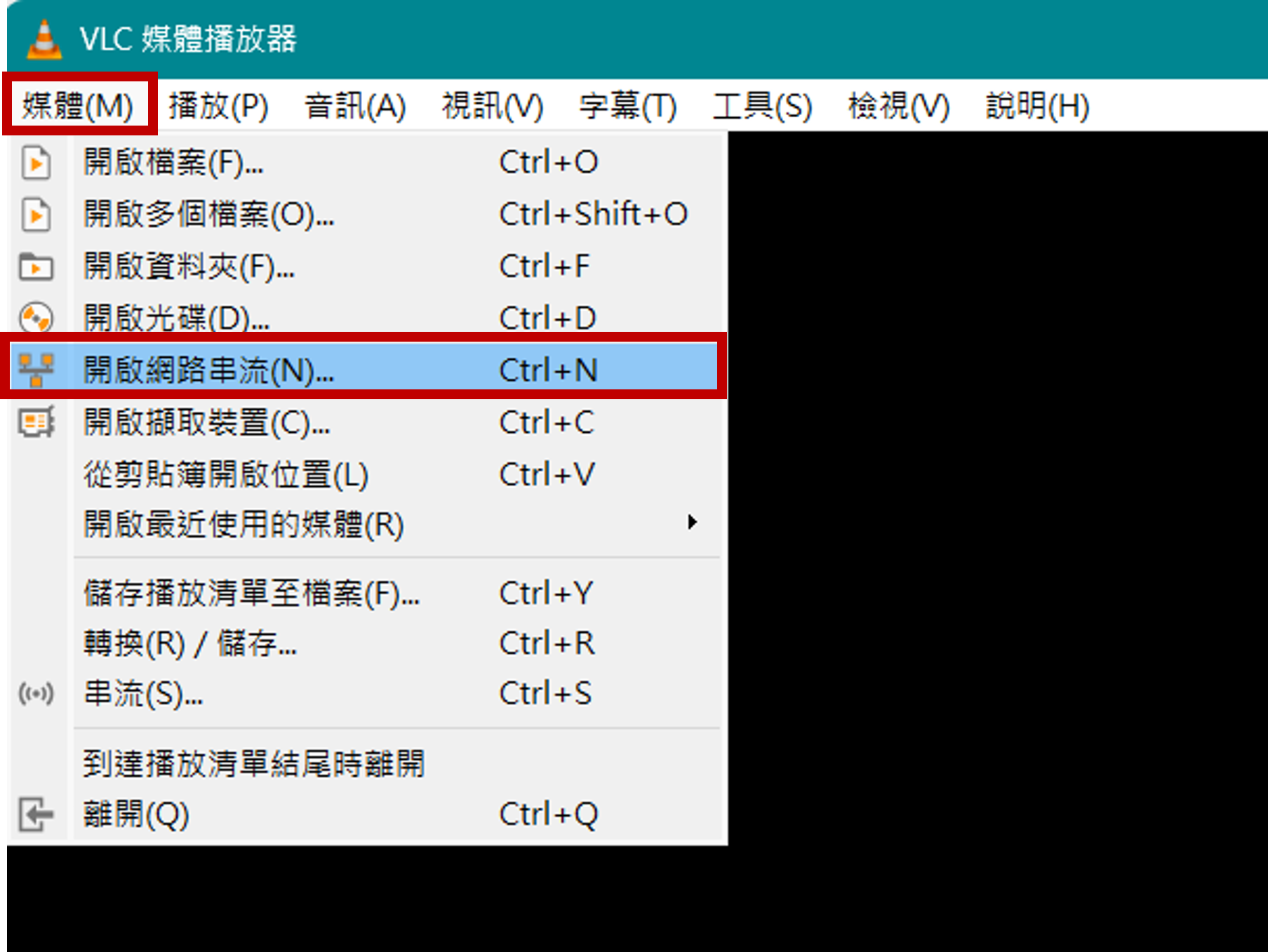
圖片來源:NTNU AIOTLab 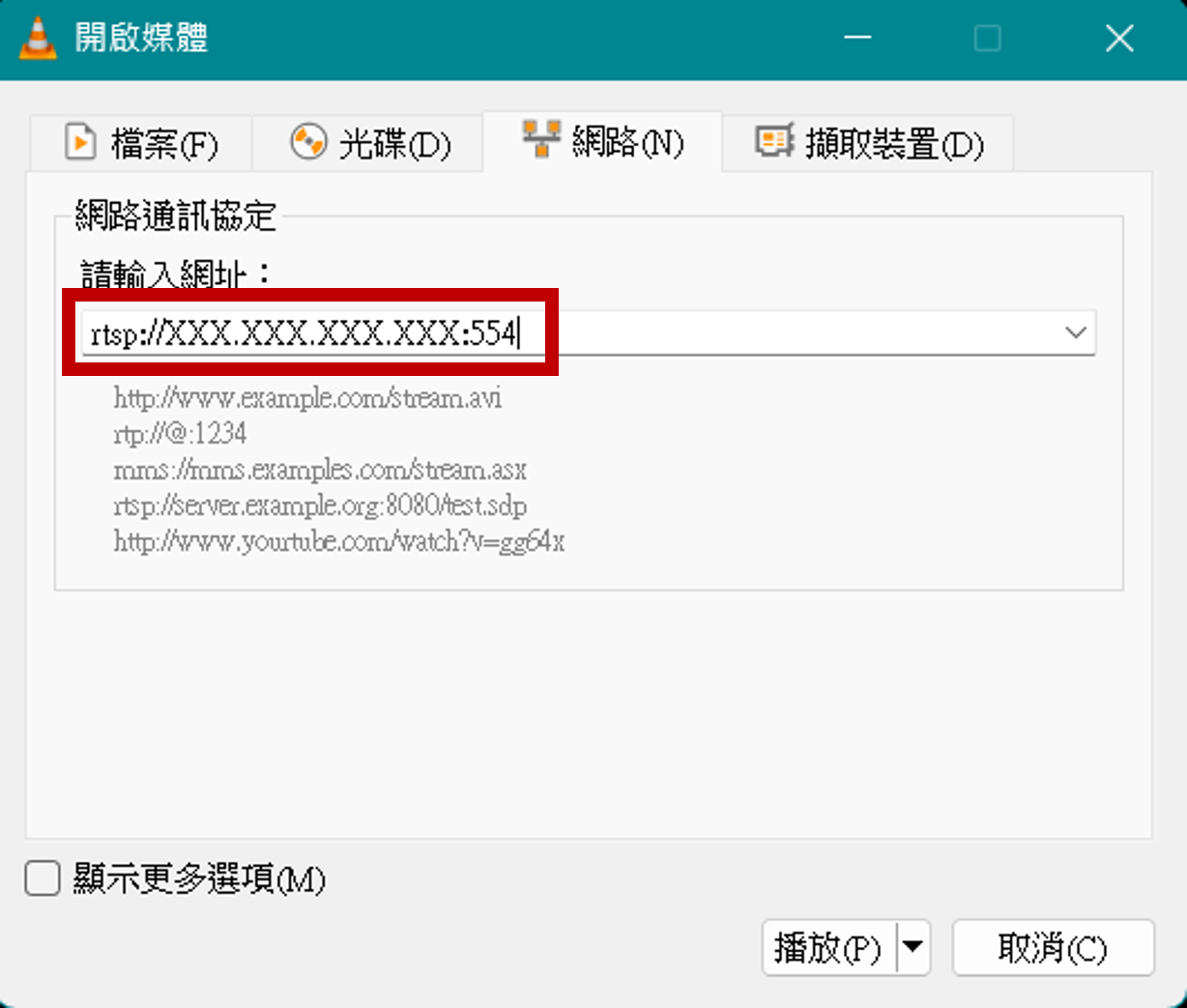
圖片來源:NTNU AIOTLab 預先訓練模型總共可以識別 80 種不同類型的物件
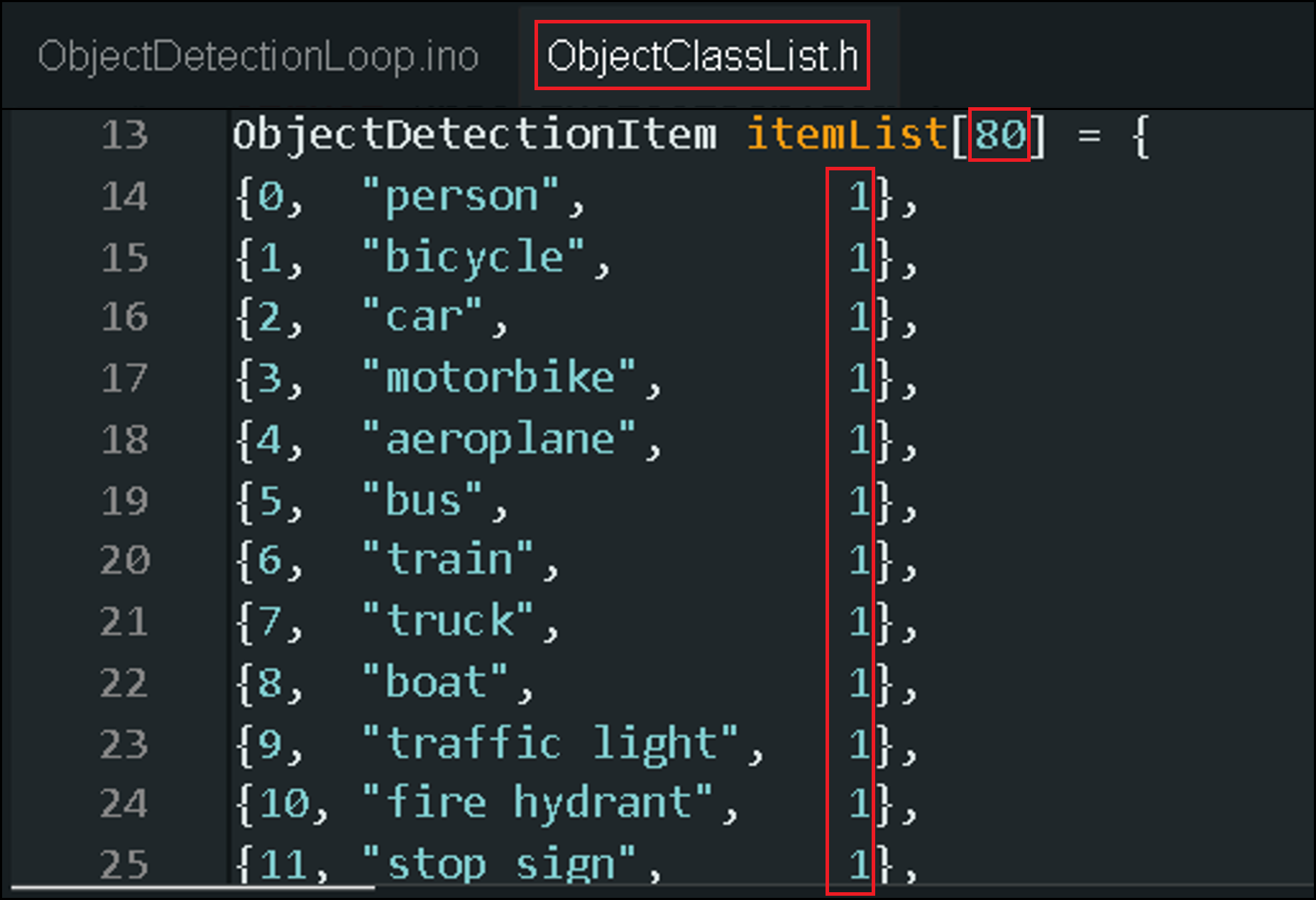
圖片來源:NTNU AIOTLab 要停用某些物件的識別,請將filter設置為 0
-
什麼是「圖片分類」?
給定一張圖片,模型的任務是判斷該圖片中的主要物體屬於哪個預先定義好的類別。例如,在貓狗分類中,模型需要判斷輸入圖片中的是貓還是狗。
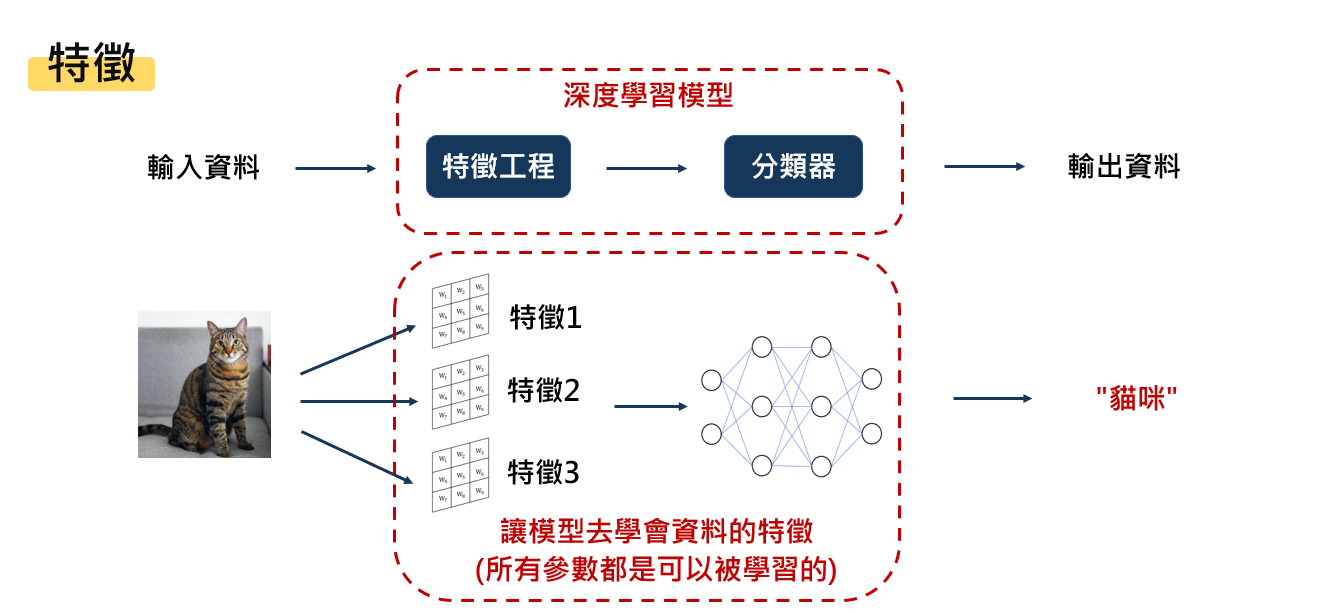
圖片來源:NTNU AIOTLab -
使用 Ameba 實作「圖片分類」
透過連接在 Ameba 開發板上的鏡頭,我們可以即時將拍到的畫面進行「圖片分類」辨識,因為 Ameba 本身自己就有 Wifi 天線,所以在「程式碼」中,需指定與想觀看鏡頭串流的電腦 VLC 應用程式的無線網路是使用同一個 AP 。
在Arduino IDE中,尋找以下路徑:

【程式碼】
/*
 Example guide:
 https://ameba-doc-arduino-sdk.readthedocs-hosted.com/en/latest/ameba_pro2/amb82-mini/Example_Guides/Neural%20Network/Image%20Classification.html

 NN Model Selection
 Select Neural Network(NN) task and models using .modelSelect(nntask, objdetmodel, facedetmodel, facerecogmodel, audclassmodel, imgclassmodel).
 Replace with NA_MODEL if they are not necessary for your selected NN Task.

 NN task
 =======
 OBJECT_DETECTION/ FACE_DETECTION/ FACE_RECOGNITION/ AUDIO CLASSIFICATION/ IMAGE CLASSIFICATION

 Models
 =======
 YOLOv3 model               DEFAULT_YOLOV3TINY   / CUSTOMIZED_YOLOV3TINY
 YOLOv4 model               DEFAULT_YOLOV4TINY   / CUSTOMIZED_YOLOV4TINY
 YOLOv7 model               DEFAULT_YOLOV7TINY   / CUSTOMIZED_YOLOV7TINY
 SCRFD model                DEFAULT_SCRFD        / CUSTOMIZED_SCRFD
 MobileFaceNet model        DEFAULT_MOBILEFACENET/ CUSTOMIZED_MOBILEFACENET
 YAMNET model               DEFAULT_YAMNET       / CUSTOMIZED_YAMNET
 Custom CNN model           DEFAULT_IMGCLASS     / CUSTOMIZED_IMGCLASS
 MobileNetV2 model          DEFAULT_IMGCLASS_MOBILENETV2     / CUSTOMIZED_IMGCLASS_MOBILENETV2
 No model                   NA_MODEL
 */

#include "WiFi.h"
#include "StreamIO.h"
#include "VideoStream.h"
#include "RTSP.h"
#include "NNImageClassification.h"
#include "VideoStreamOverlay.h"
#include "ClassificationClassList.h"

// Enable only the model comes with metadata embedded, else ClassList need to be updated
#define USE_MODEL_META_DATA_EN 1

// Color of images used to train the cnn model (RGB or Grayscale)
#define IMAGERGB 0

#define CHANNEL   0
#define CHANNELNN 3

// Lower resolution for NN processing
// Modify according to the model's input shape size
#define NNWIDTH  224
#define NNHEIGHT 224

VideoSetting config(VIDEO_FHD, 30, VIDEO_H264, 0);
VideoSetting configNN(NNWIDTH, NNHEIGHT, 10, VIDEO_RGB, 0);
NNImageClassification imgclass;
RTSP rtsp;
StreamIO videoStreamer(1, 1);
StreamIO videoStreamerNN(1, 1);

char ssid[] = "Network_SSID";    // your network SSID (name)
char pass[] = "Password";        // your network password
int status = WL_IDLE_STATUS;

IPAddress ip;
int rtsp_portnum;

void setup()
{
    Serial.begin(115200);

    // attempt to connect to Wifi network:
    while (status != WL_CONNECTED) {
        Serial.print("Attempting to connect to WPA SSID: ");
        Serial.println(ssid);
        status = WiFi.begin(ssid, pass);

        // wait 2 seconds for connection:
        delay(2000);
    }
    ip = WiFi.localIP();

    // Configure camera video channels with video format information
    // Adjust the bitrate based on your WiFi network quality
    config.setBitrate(2 * 1024 * 1024);    // Recommend to use 2Mbps for RTSP streaming to prevent network congestion
    Camera.configVideoChannel(CHANNEL, config);
    Camera.configVideoChannel(CHANNELNN, configNN);
    Camera.videoInit();

    // Configure RTSP with corresponding video format information
    rtsp.configVideo(config);
    rtsp.begin();
    rtsp_portnum = rtsp.getPort();

    // Configure object detection with corresponding video format information
    // Select Neural Network(NN) task and models
    imgclass.configVideo(configNN);
    imgclass.configInputImageColor(IMAGERGB);    // only valid use for custom CNN model (e.g sequential)
    imgclass.useModelMetaData(USE_MODEL_META_DATA_EN);
    imgclass.setResultCallback(ICPostProcess_MobileNetV2);                                                               // MobileNetV2 model callback function: ICPostProcess_MobileNetV2, custom CNN model (e.g sequential) callback function: ICPostProcess
    imgclass.modelSelect(IMAGE_CLASSIFICATION, NA_MODEL, NA_MODEL, NA_MODEL, NA_MODEL, DEFAULT_IMGCLASS_MOBILENETV2);    // if using MobileNetV2 model: DEFAULT_IMGCLASS_MOBILENETV2/CUSTOMIZED_IMGCLASS_MOBILENETV2, custom CNN model (e.g sequential): DEFAULT_IMGCLASS/CUSTOMIZED_IMGCLASS
    imgclass.begin();

    // Configure StreamIO object to stream data from video channel to RTSP
    videoStreamer.registerInput(Camera.getStream(CHANNEL));
    videoStreamer.registerOutput(rtsp);
    if (videoStreamer.begin() != 0) {
        Serial.println("StreamIO link start failed");
    }

    // Start data stream from video channel
    Camera.channelBegin(CHANNEL);

    // Configure StreamIO object to stream data from RGB video channel to object detection
    videoStreamerNN.registerInput(Camera.getStream(CHANNELNN));
    videoStreamerNN.setStackSize();
    videoStreamerNN.setTaskPriority();
    videoStreamerNN.registerOutput(imgclass);
    if (videoStreamerNN.begin() != 0) {
        Serial.println("StreamIO link start failed");
    }

    // Start data stream from video channel
    Camera.channelBegin(CHANNELNN);

    // Start OSD drawing on RTSP video channel
    OSD.configVideo(CHANNEL, config);
    OSD.begin();
}

void loop()
{
    // Do nothing
}

// User callback function for MobileNetV2 model
void ICPostProcess_MobileNetV2(std::vector<ImageClassificationResult> results)
{
    OSD.createBitmap(CHANNEL);
    for (int i = 0; i < imgclass.getResultCount(); i++) {
        ImageClassificationResult imgclass_item = results[i];
        int class_id = (int)imgclass_item.classID();
        int prob = 0;
        if (imgclassMobileNetV2ItemList[class_id].filter) {
            char text_str[40];
            prob = imgclass_item.score();
            if (USE_MODEL_META_DATA_EN) {
                snprintf(text_str, sizeof(text_str), "class:%s %d", imgclass.getClassNameFromMeta(imgclass.model_meta_data, class_id, (int)(prob)), (int)(prob));
            } else {
                snprintf(text_str, sizeof(text_str), "class:%s %d", imgclassMobileNetV2ItemList[class_id].imgclassName, imgclass_item.score());
                printf("class:%s %d\r\n", imgclassMobileNetV2ItemList[class_id].imgclassName, imgclass_item.score());
            }
            OSD.drawText(CHANNEL, 20, 20, text_str, OSD_COLOR_CYAN);
        }
    }
    OSD.update(CHANNEL);
}

// User callback function for custom CNN (e.g sequential)
void ICPostProcess(std::vector<ImageClassificationResult> results)
{
    if (imgclass.getResultCount() > 0) {
        // uncomment if you would like to see all the probabilities for all classes
        // printf("---- probabilities for all classes ----\r\n");
        // for (int i = 0; i < imgclass.getResultCount(); i++) {
        //     ImageClassificationResult imgclass_item = results[i];
        //     int class_id = (int)imgclass_item.classID();
        //     if (imgclassItemList[class_id].filter) {
        //         printf("class:%s %d\r\n", imgclassItemList[class_id].imgclassName, imgclass_item.score());
        //     }
        // }

        OSD.createBitmap(CHANNEL);
        char text_str[40];
        ImageClassificationResult top_imgclass_item = results[0];
        int top_class_id = (int)top_imgclass_item.classID();
        if (imgclassItemList[top_class_id].filter) {
            snprintf(text_str, sizeof(text_str), "class:%s %d", imgclassItemList[top_class_id].imgclassName, top_imgclass_item.score());
            printf("top class detected: %s %d\r\n", imgclassItemList[top_class_id].imgclassName, top_imgclass_item.score());
        }
        OSD.drawText(CHANNEL, 20, 20, text_str, OSD_COLOR_CYAN);
        OSD.update(CHANNEL);
    }
}
將以下兩行改成你的無線網路環境。
char ssid[] = "Network_SSID";    // your network SSID (name)
char pass[] = "Password";        // your network password
燒錄程式後,點選右上角的放大鏡圖示,打開 Serial Monitor ,找到 Ameba 的 IP address 。
圖片來源:NTNU AIOTLab 圖片來源:NTNU AIOTLab 打開 VLC Media Player 的 媒體/開啟網路串流,輸入rtsp://你的IP Address:554
圖片來源:NTNU AIOTLab 圖片來源:NTNU AIOTLab
-
什麼是「物件偵測」?